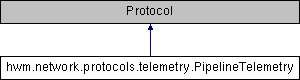
Represents a pipeline telemetry connection.
More...
|
|
| session_coordinator |
| |
|
| session |
| |
Represents a pipeline telemetry connection.
This Protocol is used to represent a connection to a pipeline's telemetry stream. It is responsible for relaying telemetry data (provided by the Session) to the connected pipeline user. Typically, the user will connect to a pipeline's telemetry stream via their browser as they monitor the pass using the Mercury2 User Interface. Because pipeline telemetry is inherently message based, and because it needs to be easily accessible by a web browser, this Protocol uses the WebSocket protocol.
- Note
- Because this protocol is inherently one way, any data sent by the user will simply be dropped.
- See Also
- https://en.wikipedia.org/wiki/WebSocket
| def hwm.network.protocols.telemetry.PipelineTelemetry.__init__ |
( |
|
self, |
|
|
|
session_coordinator |
|
) |
| |
Sets up the PipelineTelemetry protocol instance.
- Parameters
-
| session_coordinator | A SessionCoordinator instance that will be used to locate requested sessions. |
| def hwm.network.protocols.telemetry.PipelineTelemetry._connection_setup_error |
( |
|
self, |
|
|
|
failure |
|
) |
| |
|
private |
Handles errors that arise during the telemetry protocol connection setup.
 This callback handles errors that may occur when authenticating the protocol user and loading their requested
 session. It logs the error and cleans up the protocol's connection.
- Parameters
-
| failure | A Failure object encapsulating the error. |
- Returns
- Returns None after handling the error.
| def hwm.network.protocols.telemetry.PipelineTelemetry._package_telemetry |
( |
|
self, |
|
|
|
source_id, |
|
|
|
stream, |
|
|
|
timestamp, |
|
|
|
telemetry_datum, |
|
|
|
binary = False, |
|
|
|
extra_headers |
|
) |
| |
|
private |
Packages a telemetry point into a JSON string.
 This method packages up the provided telemetry data point into a JSON string in preparation for transmission. The
 extra_headers will be included as top level attributes in the resulting JSON object.
- Note
- If the telemetry point consists of binary data, it will be BASE64 encoded before being returned.
- Parameters
-
| source_id | The ID of the device or pipeline that generated the telemetry datum. |
| stream | A string identifying which of the device's telemetry streams the datum should be associated with. |
| timestamp | A unix timestamp specifying when the telemetry point was assembled. |
| telemetry_datum | The actual telemetry datum. Can take many forms (e.g. a dictionary or binary webcam image). |
| binary | Whether or not the telemetry payload consists of binary data. If set to true, the data will be encoded before being sent to the user. |
| **extra_headers | A dictionary containing extra keyword arguments that should be included as additional headers when sending the telemetry datum. |
- Returns
- Returns a JSON string encapsulating the telemetry data point.
| def hwm.network.protocols.telemetry.PipelineTelemetry.connectionMade |
( |
|
self) | |
|
Sets up the telemetry protocol before any data transfer occurs.
 This method sets up the protocol right after the connection has been established. It is responsible for calling a
 function that will wait and load the user's certificate after the TLS handshake has been performed.
- Note
- Because this method may be (and probably will be) called before the connection's TLS handshake is complete, it calls an additional function that periodically checks if the client's certificate is available and, once it is, returns it via a deferred. Any data that the user tries to pass to the connection before the TLS handshake has completed will be dropped.
- Returns
- Returns a deferred that will be fired with the requested Session.
| def hwm.network.protocols.telemetry.PipelineTelemetry.dataReceived |
( |
|
self, |
|
|
|
data |
|
) |
| |
Receives any data that the user may try to send over the connection.
- Note
- Because the telemetry stream is one way, any data received by this function will simply be ignored.
- Parameters
-
| data | A chunk of data of arbitrary size from the user that will be ignored. |
| def hwm.network.protocols.telemetry.PipelineTelemetry.perform_registrations |
( |
|
self, |
|
|
|
requested_session |
|
) |
| |
Performs the necessary registrations between the protocol and its associated session.
 This callback makes the necessary registrations between the pipeline data protocol, its Session, and its pipeline's
 telemetry producer. It will be called with session specified in the client's TLS certificate after the TLS handshake
 is complete.
- Exceptions
-
| May | pass along session.ProtocolAlreadyRegistered exceptions when trying to register this protocol with its session. |
- Parameters
-
| requested_session | The session associated with the protocol. |
- Returns
- Returns the newly loaded Session that was passed to this callback.
| def hwm.network.protocols.telemetry.PipelineTelemetry.write_telemetry |
( |
|
self, |
|
|
|
source_id, |
|
|
|
stream, |
|
|
|
timestamp, |
|
|
|
telemetry_datum, |
|
|
|
binary = False, |
|
|
|
extra_headers |
|
) |
| |
Sends a telemetry data point to the user.
 This method sends the specified telemetry data point to the protocol's connected user. It will first package up the
 telemetry point into a JSON string and then send it to the user.
- Parameters
-
| source_id | The ID of the device or pipeline that generated the telemetry datum. |
| stream | A string identifying which of the device's telemetry streams the datum should be associated with. |
| timestamp | A unix timestamp specifying when the telemetry point was assembled. |
| telemetry_datum | The actual telemetry datum. Can take many forms (e.g. a dictionary or binary webcam image). |
| binary | Whether or not the telemetry payload consists of binary data. If set to true, the data will be encoded before being sent to the user. |
| **extra_headers | A dictionary containing extra keyword arguments that should be included as additional headers when sending the telemetry datum. |
The documentation for this class was generated from the following file:
- hwm/network/protocols/telemetry.py
 1.8.4
1.8.4 
